Posts

How to Run, Install, Start, and Stop Atlassian Bamboo Remote Agents

Image
Managing your Atlassian Bamboo Remote Agents can be a breeze once you understand the initial setup and the commands needed to control the service. Let’s dive into the process of getting your agent up and running and explore how to manage it effectively. Initial Run and Setup Scripts When you run your agent for the first time, it generates control scripts to handle the installation and service management. To start the agent, use the following command, making sure to replace <Bamboo Base URL> with your Bamboo server’s base URL: java [parameters] -jar atlassian-bamboo-agent-installer- X . X - SNAPSHOT . jar < Bamboo Base URL >/agentServer/ [console] Stopping the Agent There might be times when you need to stop your remote agent. To do this, you can identify the process and force it to terminate using the following commands: ps aux | grep -i bamboo | awk '{print $2}' | xargs kill - 9 Installation Directory Move to the directory where the Bamboo agen...

Why NTFS Compression Might Slow Down Your Computer

Image
When you use a Windows computer or server, you might find a feature called NTFS compression. This is supposed to make your files take up less space on your hard drive, which sounds great, right? But there’s a catch: sometimes, this compression can make your computer slower. Let’s explore why that happens. What Does NTFS Compression Do? NTFS compression squishes your files and folders so they use less space. Each time you open or change a file, the system needs to un-squish (decompress) it or squish it again (compress). This can use a bit of your computer’s brain power — its CPU for LZNT1 or LZX algorithm, which optimised to utilise minimum CPU. Compress by LZNT1 Testing How It Works Some people think that if you have a strong CPU and a slow hard drive, NTFS compression will make your computer faster. To see if this is true, you can do a test. First, check if compression is turned on or off with this command: fsutil behavior query DisableCompression To turn it off, type: fsutil behavior...

TabPy server installation and setup for Tableau

Image
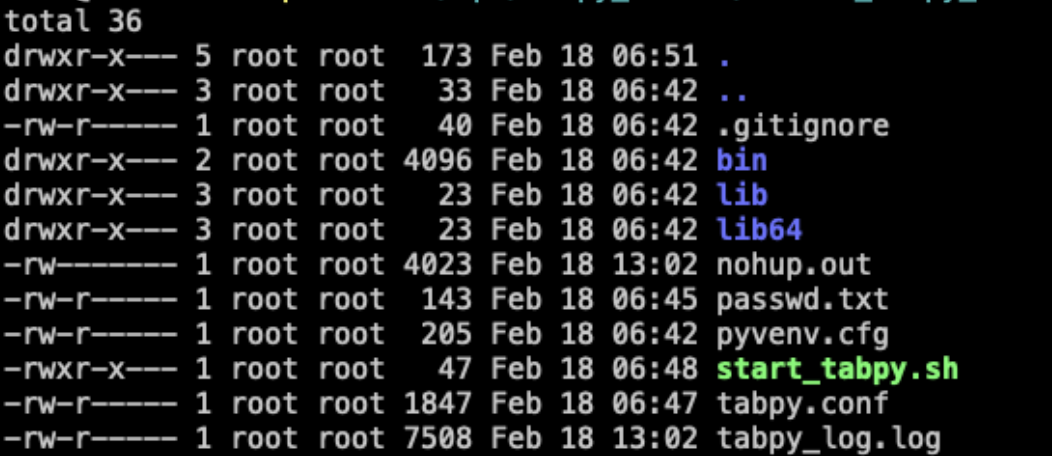
  Introduction TabPy (the Tableau Python Server) is an Analytics Extension implementation which expands Tableau’s capabilities by allowing users to execute Python scripts and saved functions via Tableau’s table calculations. Requirements Python 3.6 + Pip Running Tableau server Installation directions Note Its recommended that tabpy be executed in a virtual environment and that is the installation and setup process highlighted below Update pip python - m pip install -- upgrade pip Install virtualenv package pip install virtualenv Create the Tabpy folder structures. This will be used to hold files needed by Tabpy and those generated by it such as logs. See example below in /opt/tabpy_server/ i.e. Create virtual environment virtualenv my - tabpy - env Activate the environment source my - tabpy - env / bin / activate   Install Tabpy pip install tabpy Create a password file. This file will be used to hold username and encrypted password details for Tabpy users touch passwd.txt Cre...